Connecting External Devices
Devices flashed with a Thymis image connect to the Controller on their own. An external device is one you set up yourself, e.g. an existing Linux server or a Raspberry Pi running another distribution. It connects by running the Thymis agent once with a pairing code.
Requirements
- Linux, with the agent running as
root. - An OpenSSH server listening on
localhost:22that allowsrootto log in with a public key (PermitRootLogin prohibit-passwordoryes) and serves an ed25519 host key (see SSH host key). The Controller opens its SSH sessions through the agent’s tunnel, so port 22 does not need to be reachable from outside. - Outbound HTTP(S) access to the Controller’s agent URL (see Firewall Rules).
- Deploying Thymis configurations to the device requires NixOS. On other distributions, the device shows up in Thymis and can be reached via the terminal, but configurations cannot be deployed to it.
Pairing codes
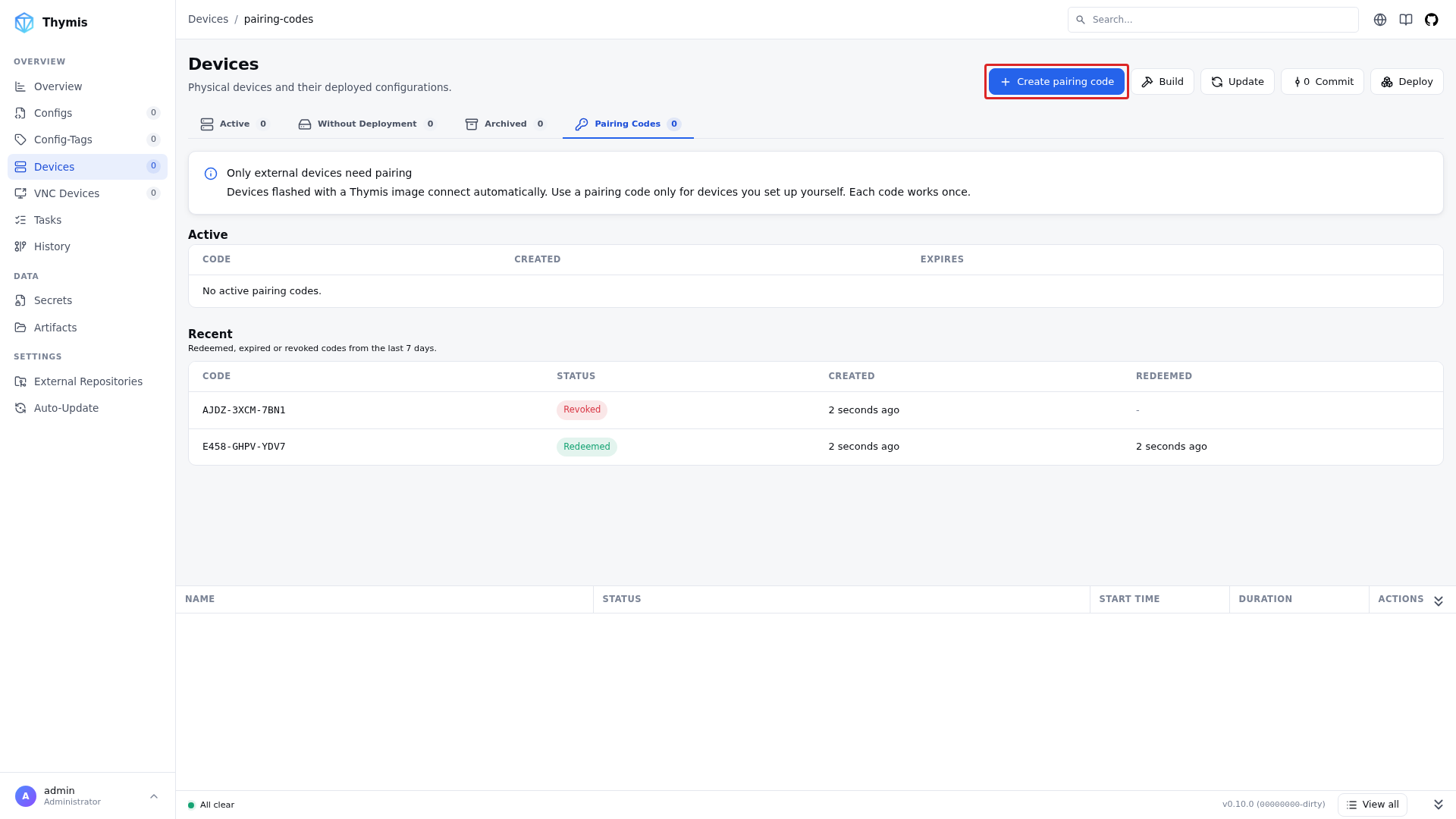
Open Devices → Pairing Codes and click Create pairing code.
The dialog shows the code and a ready-to-copy command for each start method (Python, Nix, Docker ARM, Docker x86).
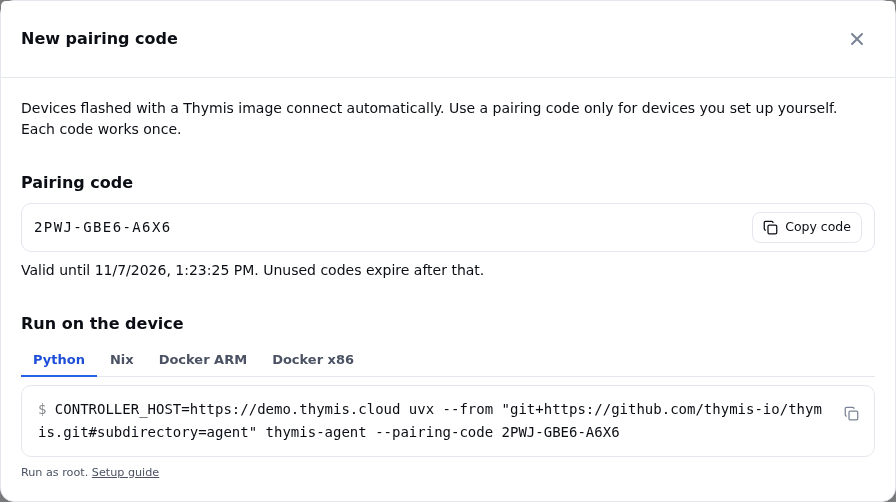
- Lifetime: 24 hours. Unused codes expire after that.
- Single use: the first device that redeems a code gets an agent token in exchange and the code is used up. That device can retry with the same code, e.g. after a network error, but any other device is rejected.
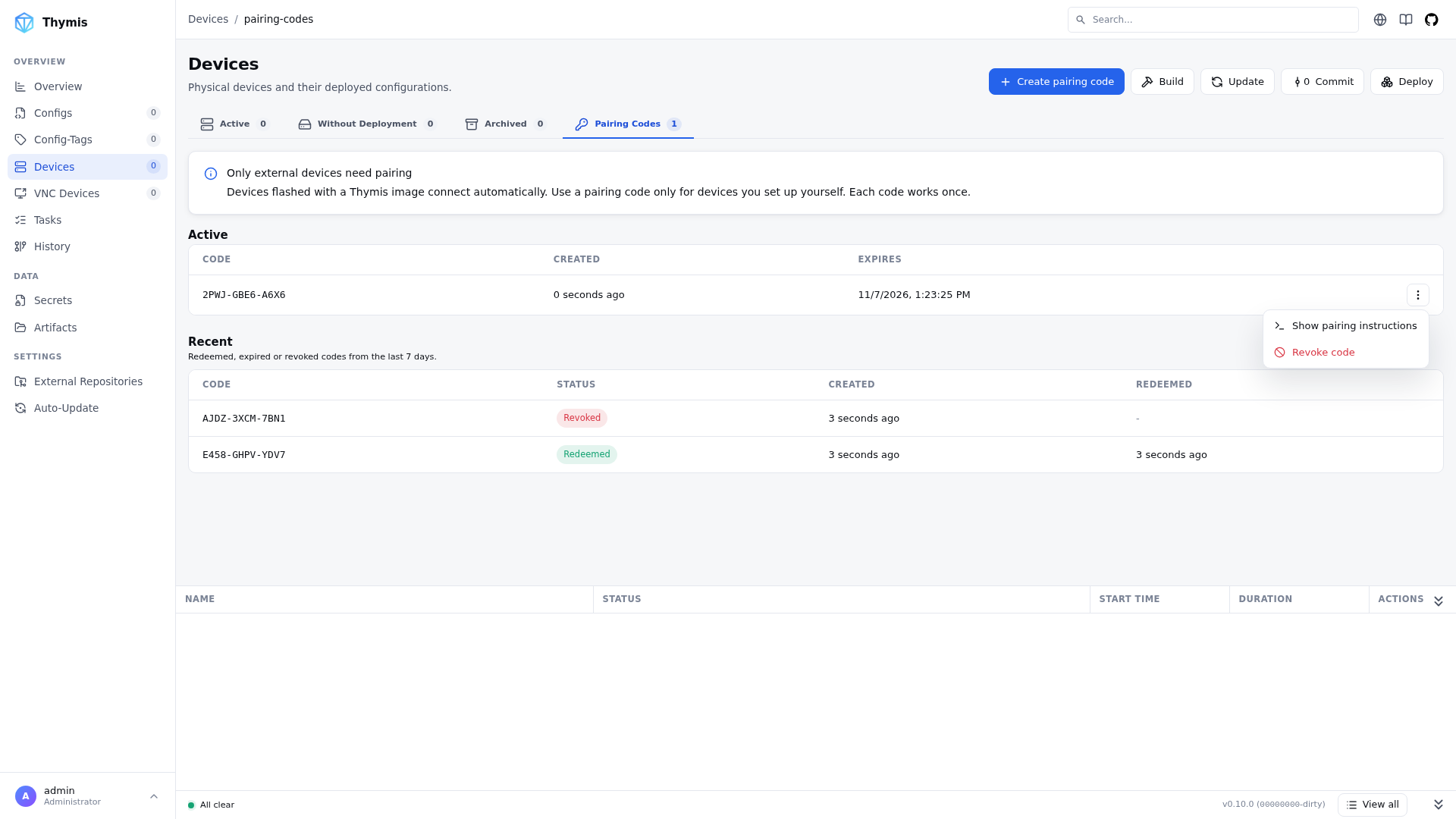
- Revoking: an unused code can be revoked from the row menu in the Active table. The row menu also shows the pairing instructions again.
- Recent: redeemed, expired and revoked codes stay listed for 7 days.
The pairing code is only needed once. After pairing, the agent stores its token in /etc/thymis/thymis-token.txt and uses it on every later start; a --pairing-code argument is then ignored.
SSH host key
The device is identified by its ed25519 SSH host key, /etc/ssh/ssh_host_ed25519_key by default. Most distributions create it when OpenSSH is installed. Check with:
ls /etc/ssh/ssh_host_ed25519_key.pubIf it is missing, create the missing default host keys and reload the SSH server (the service is called ssh on Debian and Ubuntu, sshd elsewhere):
ssh-keygen -A
systemctl reload sshd
To use a key at another location, e.g. /etc/thymis/ssh_host_ed25519_key:
- Create it:
ssh-keygen -q -t ed25519 -N "" -f /etc/thymis/ssh_host_ed25519_key - Let
sshdserve it by addingHostKey /etc/thymis/ssh_host_ed25519_keyto/etc/ssh/sshd_config, thensystemctl reload sshd. - Start the agent with
SSH_HOST_KEY_PATH=/etc/thymis/ssh_host_ed25519_key. The public key must be next to it, at<path>.pub.
Running the agent
All methods take the same configuration:
| Setting | Description |
|---|---|
CONTROLLER_HOST | Required. The Controller’s agent URL, e.g. https://thymis.example.com (THYMIS_AGENT_ACCESS_URL on the Controller). |
--pairing-code CODE | The pairing code. Only needed until the device is paired. |
MANAGE_HOSTNAME=true | Optional. Apply the hostname set in Thymis to the device. Off by default. |
DEFAULT_HOSTNAME | Optional. Hostname to use while Thymis has not set one. Defaults to thymis. |
SSH_HOST_KEY_PATH | Optional. Private ed25519 host key of the device. Defaults to /etc/ssh/ssh_host_ed25519_key. See SSH host key. |
Run the commands below as root (e.g. in sudo -i). Once the log shows Successfully SSH connected, the device appears under Devices → Active.
Python
Requires Python 3.11 or newer and git.
python3 -m venv /opt/thymis-agent
/opt/thymis-agent/bin/pip install "git+https://github.com/thymis-io/thymis.git#subdirectory=agent"
CONTROLLER_HOST=https://thymis.example.com /opt/thymis-agent/bin/thymis-agent --pairing-code XXXX-XXXX-XXXX
With uv, installing and running is one step:
CONTROLLER_HOST=https://thymis.example.com uvx --from "git+https://github.com/thymis-io/thymis.git#subdirectory=agent" thymis-agent --pairing-code XXXX-XXXX-XXXXTo keep the agent running, stop it after pairing and install it as a systemd service, e.g. /etc/systemd/system/thymis-agent.service:
[Unit]
Description=Thymis agent
After=network-online.target sshd.service
Wants=network-online.target

[Service]
Type=notify
TimeoutStartSec=infinity
Environment=CONTROLLER_HOST=https://thymis.example.com
ExecStart=/opt/thymis-agent/bin/thymis-agent
Restart=always

[Install]
WantedBy=multi-user.targetsystemctl daemon-reload
systemctl enable --now thymis-agentNix
With Nix installed:
CONTROLLER_HOST=https://thymis.example.com nix run github:thymis-io/thymis#thymis-agent -- --pairing-code XXXX-XXXX-XXXXDocker
Images are published to the GitHub Container Registry:
- x86_64:
ghcr.io/thymis-io/thymis-agent:latest - ARM64 (e.g. Raspberry Pi):
ghcr.io/thymis-io/thymis-agent:latest-arm64
View all tags on GitHub Container Registry
Run it in the host’s network namespace, so localhost:22 is the host’s SSH server, and mount the directories the agent reads and writes:
docker run -d --name thymis-agent --restart unless-stopped
  --network host
  -e CONTROLLER_HOST=https://thymis.example.com
  -v /etc/thymis:/etc/thymis
  -v /etc/ssh:/etc/ssh:ro
  -v /root/.ssh:/root/.ssh
ghcr.io/thymis-io/thymis-agent:latest --pairing-code XXXX-XXXX-XXXX| Mount | Purpose |
|---|---|
/etc/thymis | Agent token and device identity; without it, every restart needs a new code. |
/etc/ssh | The host’s SSH host key, which identifies the device to the Controller. |
/root/.ssh | The agent adds the Controller’s SSH key to root’s authorized_keys. |
With a custom SSH_HOST_KEY_PATH, mount the key’s directory and pass the path inside the container, e.g. -e SSH_HOST_KEY_PATH=/etc/thymis/ssh_host_ed25519_key (already covered by the /etc/thymis mount).
Secrets are written inside the container unless you also mount their target paths. Follow the logs with docker logs -f thymis-agent.
Troubleshooting
Controller rejected pairing code (404): the code is unknown, expired, revoked or was redeemed by another device. Create a new one.Agent token not found and no pairing code provided: the device is not paired yet, or/etc/thymiswas not persisted. Run the agent with--pairing-code.- Agent keeps reconnecting, device never appears: check that
sshdlistens onlocalhost:22and permits public-key login forroot. - Cloned device refused: two devices with the same SSH host keys cannot be connected at the same time. Regenerate the host keys on the clone, delete
/etc/thymis/thymis-token.txtand pair it with a new code. - Re-pairing: delete
/etc/thymis/thymis-token.txtand run the agent with a new pairing code.